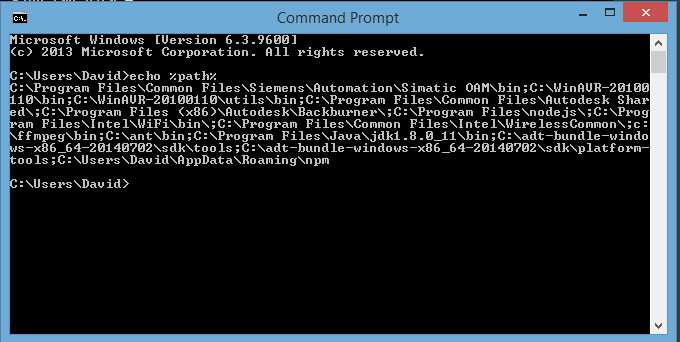
I am currently having an issue installing phonegap 3.5 via npm on my windows 8.1 OS. I already installed and set my path as seen in this image http://i653.photobucket.com/albums/uu260/tidus_david/path.png
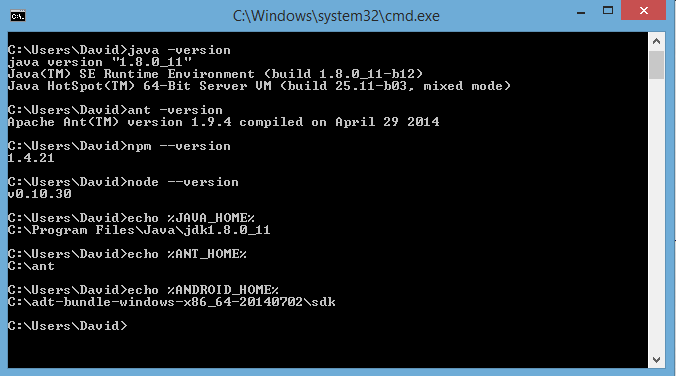
I already installed ANT, JDK and Android SDK as seen in this image http://i653.photobucket.com/albums/uu260/tidus_david/Error.png
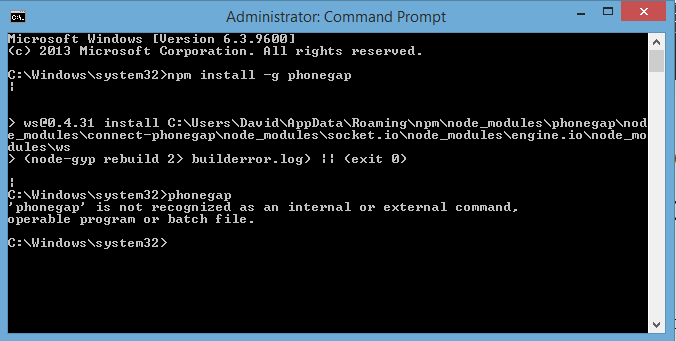
and finally when I try to npm install -g phonegap I always get the error shown in the image http://i653.photobucket.com/albums/uu260/tidus_david/npminstallerror.png
I tried removing the npm modules folder from %APPDATA%, also I tried to npm cache clear without results. What is happening? I tried for days to install it without success, here I attach my log https://mega.co.nz/#!X8BWxQyD!Ikn9wMdjnsGuFlZSqNwxpSPI92MNyzw95P4qMbL4BuQ
Also I tried out to install cordova, and it installs but when I try to cordova add android platform it fails and says that ant is not installed I have ant installed, I already search all over google and stackoverflow for answers about this issue, I am totally sure that my path is ok and that ant is installed because it returns the version when I write in the cmd ant -version Also the cmd I am using haves Admin privileges. I tried to install phonegap version 3.4 and it installed but when I tried to compile it shows ant error.
Any ideas?

Going through your screenshots and error log. Everything looks fine and your PATH has been properly defined, and as you said, ANT can print its -version number when queried so it's definitely not a problem with ANT
It looks like a problem with npm, if you have NodeJS, you will need to upgrade npm by downloading the latest NodeJS package (you might want to perform a clean install to be on the safe side).